07 - 應用
- 自然語言處理 - jieba 中文分詞
- API 使用 - LINE Notify
- API 使用 - Google Maps 與 json 解析
- 本機環境安裝
- 檔案總管操作 - shutil, os
- 圖片處理 - PIL(Pillow)
- 檔案讀寫 - open
- 綜合應用 - 圖片下載器
自然語言處理 - jieba 中文分詞
In [1]:
import jieba
word = "2012年我創立了一間公司 來教女孩寫程式"
seg_list = jieba.cut(word, cut_all=True)
print("Full Mode: " + "/ ".join(seg_list))

seg_list = jieba.cut_for_search(word)
print("Search Mode: " + "/ ".join(seg_list))
試試看,怎麼使用 jieba 把切出來的詞標註詞性
API 使用 - LINE Notify
建立 LINE Notify 個人權杖
LINE Notify 登入
=> 個人頁面
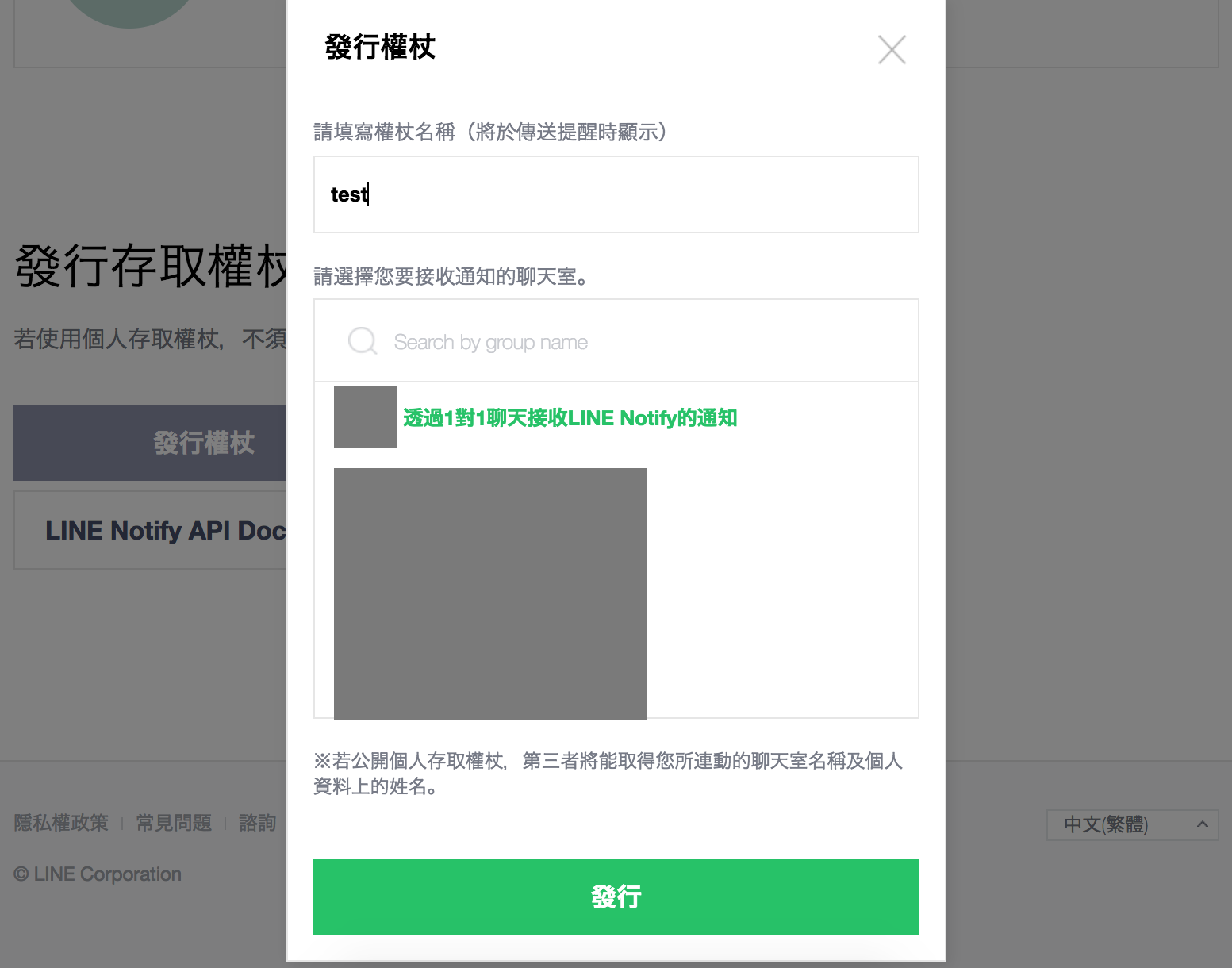
=> 發行權杖
=> 選擇 「透過1對1聊天接收LINE Notify的通知」或是任何已存在群組
=> 發行
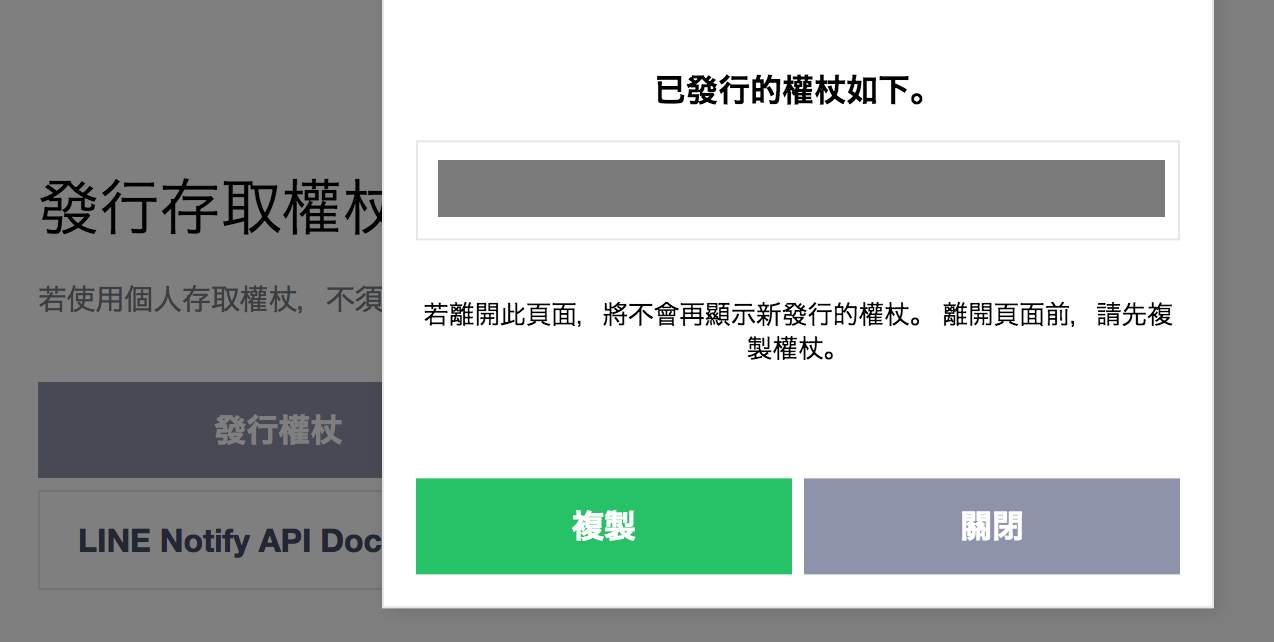
=> 複製權杖
權杖只會出現一次,請記得複製、保存好
Coding Time
In [2]:
import requests
token = "你的權杖"
msg = "用 Python 發 LINE Notify 通知"

url = "https://notify-api.line.me/api/notify"
headers = {
    "Authorization": "Bearer " + token,
    "Content-Type" : "application/x-www-form-urlencoded"
}
payload = {'message': msg}
r = requests.post(url, headers = headers, params = payload)
API 使用 - Google Maps

啟用 Google 各服務 API
API程式庫 > Places API > 啟用

測試「地點自動完成」功能
https://maps.googleapis.com/maps/api/place/autocomplete/json?input=天瓏書局&key=你的金鑰
從文件中找找看,
- 「地點的營業時間」、「找尋鄰近地點」的 URL 為?
- 需要傳進去的參數是?
json 解析
json.loads(字串):json格式字串 -> python字典型態json.dumps(字典):python字典型態 -> json格式字串
輔助工具:Json Parser Online
In [3]:
import requests
import json
url = "https://maps.googleapis.com/maps/api/place/autocomplete/json?input=天瓏書局&key=你的金鑰"
rep = requests.get(url) # 回傳的Response物件,包含Header、網頁原始碼
html = rep.text         #      Response物件,網頁原始碼的部分
json_data = json.loads(html)
print (json_data['predictions'][0]['description'])
You can do more~
- 解析出地點的編號
- 拿取地點的營業時間、經緯度
- 獲得周邊地點資訊
In [4]:
### 資料夾處理
import os, shutil
print(os.listdir())
for name in os.listdir():
    print(os.path.isfile(name),os.path.isdir(name),name)

dir_name = "my_dir"
if dir_name not in os.listdir():
    os.makedirs(dir_name)
else:
    shutil.rmtree(dir_name)
print(os.listdir())
In [5]:
### 檔案操作 (請先建立一個名稱為「test1.txt」的檔案)
import os, shutil
filename1 = "test1.txt"
filename2 = "test2.txt"
filename3 = "test3.txt"
filename4 = "test4.txt"
filename5 = "test5.txt"
del_list = [filename3,filename4]
print(del_list)

if filename1 in os.listdir():
    shutil.copyfile(filename1,filename2)
    shutil.copyfile(filename1,filename3)
    shutil.copyfile(filename1,filename4)

if filename1 in os.listdir():
    shutil.move(filename2,filename5)

for name in os.listdir():
    if name in [filename3,filename4]:
        os.remove(name)
In [6]:
fo = open("myfile.txt","w")
fo.write("Hello")
fo.close()
In [7]:
# 非文字檔要在後面加上 "b" (請先建立一個名稱為「image.jpg」的檔案)
fi = open("image.jpg","rb")
fo = open("image2.jpg","wb")
content = fi.read()
fo.write(content)
fi.close()
fo.close()
In [8]:
import requests
img_src = "http://4.bp.blogspot.com/-6HCy6DZdqX4/U_3dySRjKPI/AAAAAAAAclI/5e4V6d7t56E/s1600/Photos4.jpg"
img_response = requests.get(img_src)
img = img_response.content
fo = open("photo.jpg","wb")
fo.write(img)
fo.close()
圖片處理 - PIL(Pillow)
In [9]:
from PIL import Image
# 再用 PIL 的 Image 處理
image = Image.open("image.jpg")
width = int(image.size[0])
height = int(image.size[1])
print(width,height)

# resize
image.thumbnail((800,800))
image.save("resize.jpg", 'JPEG', quality=90)
width = int(image.size[0])
height = int(image.size[1])
print(width,height)
In [10]:
import requests,os

### 讀取網頁內容
url = "http://blog.marsw.tw/"
response = requests.get(url)
html = response.text

### 建立資料夾
dir_name = "photo_dir"
if dir_name not in os.listdir():
    os.makedirs(dir_name)

### 把圖片網址解析出來
for temp in html.split("<img"):
    line = temp.split("/>")[0]
    if ("src=" in line):
        img_src = line.replace("\'","\"").split("src=\"")[-1].split("\"")[0]
        if ( (".jpeg" in img_src) or (".jpg" in img_src)
                or (".JPG" in img_src) or (".png" in img_src) ) :
            ### 抓取圖片
            img_response = requests.get(img_src)
            img_binary = img_response.content

            ### 建立圖片檔案
            filename=img_src.split("/")[-1]
            filepath= "{}/{}".format(dir_name,filename)
            fo = open(filepath,"wb")
            fo.write(img_binary)
            fo.close()